Resize hundreds of photos in one go
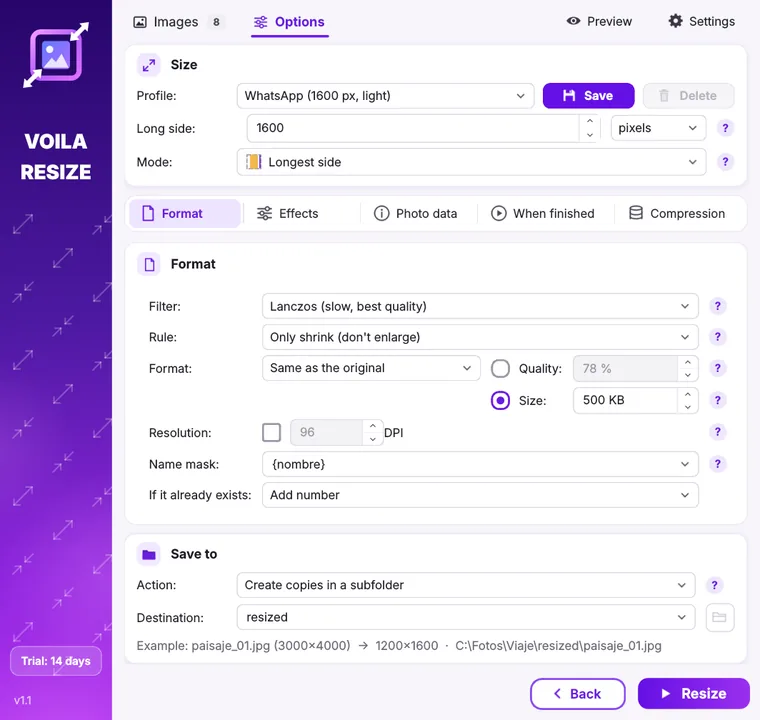
Drop in your photos, pick “WhatsApp”, “Instagram” or “Email” and press Resize. Voila Resize shrinks, converts and lightens them in seconds, without uploading anything.
Free 14-day trial with every feature. No card needed.
Three steps and done
Nothing new to learn: it works just like a Windows folder.
Add your photos
Drag them into the window, pick a folder or right-click in File Explorer: “Voila Resize”.
Pick a preset
Email, WhatsApp, Instagram, Full HD, 4K, 4 × 6 in print… or your own size in pixels, %, cm or inches.
Resize
Your new photos appear in a subfolder. Your originals stay untouched (unless you ask otherwise).
Everything you need, nothing in the way
Advanced options are there when you need them and hidden when you don't.
⤢8 resize modes
Fit, fill and crop, stretch, center on a background, longest side, percentage and Smart, which removes areas without detail.
⚖Maximum file size
Ask for “500 KB max” and Voila finds the best quality that fits. Perfect for web forms and email.
©Watermark
Your logo or text, with opacity, rotation, 9 positions and a live preview.
⇄Convert formats
Turn iPhone HEIC photos into JPG, make WEBP or AVIF for your website, or pack everything into a PDF or ZIP.
✦Quick effects
Rotate, mirror, black and white, sepia, brightness, contrast, saturation, auto levels and border.
⌖Privacy
Remove GPS location from photos before you share them. Everything happens on your PC.
One license, forever
- Every feature, no watermarks or limits
- Use it on 2 computers
- Free updates for version 1
- All 12 languages included
Secure payment by card or PayPal. Your key arrives by email right away.
Frequently asked questions
What do I need?
A 64-bit PC with Windows 10 (version 1809 or later) or 11. It installs from Microsoft Store in a minute.
What happens when the trial ends?
The program asks for your license key. Your settings and presets are kept: once activated you carry on where you left off.
Are my photos uploaded?
No. All the work happens on your computer. It only goes online to check your license.
Can I move to another computer?
Yes. In Settings → About, press “Deactivate on this PC” and activate the same key on the new one.
Does it change my original photos?
No, unless you choose “Resize the original”. By default new photos are saved in a subfolder.